The SimVimX firmware for a separate slave board is included in the system as an addition to connecting displays to the master board. You need one Uno or Nano Arduino board with special SimVimLCD firmware onboard, that you should upload from the SimVimX plugin Configurator menu.
The SimVimX LCD board connects to the main board with just two signal wires and a common ground (communication is performed via serial interface Rx/Tx #3 on the main board). It can be placed anywhere in the cockpit, most likely near the majority of the LCD displays on the panel and can drive up to 12-character LCD displays of varying sizes (L x H).
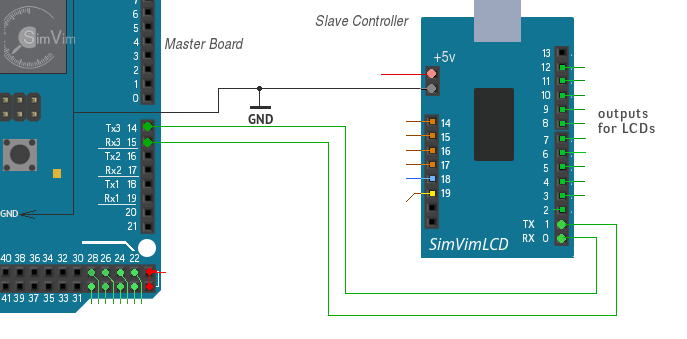
Connecting LCD displays is quite simple: all signal wires (4+1) in this system are used in parallel for all connected displays, with only one signal line used for each individual display (pins #2 - 13).

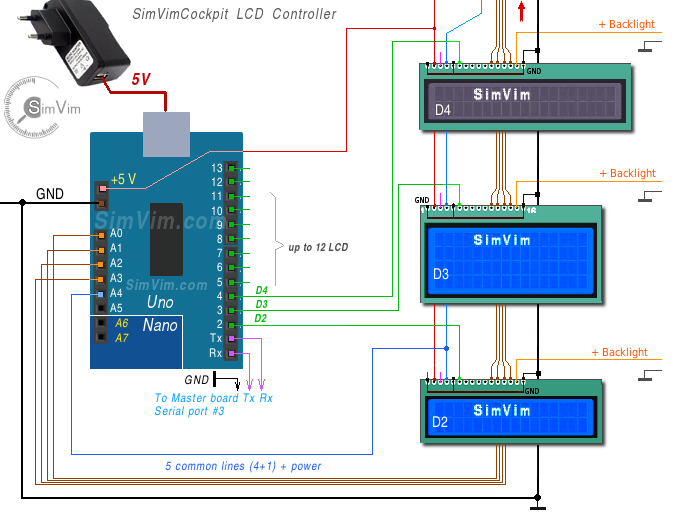
Most backlit LCD boards have 2 extra pins to power the internal LED backlight - usually pins 15(+/A) and 16(-/K). If you don't need to adjust the brightness, just connect the (-K) pin to the common ground (GND) and the (+A) pin to +5V directly or through an additional resistor (to reduce and set the required brightness).
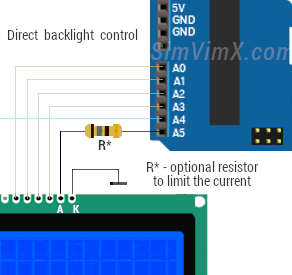
One pin (A5) on the LCD board is used (in SimVimX v.3) as PWM output to control LCDs backlight brightness and OFF state on bus power loss.
To get this output work as PWM you need to assign any dataref that you will use to control the display brightness in the SimVimX configuration window when you open the Slave LCD board for data entry.
To adjust the brightness, you need to connect the output pin A5 to any suitable PWM driver module, the outputs of which are connected to the backlight pins (A/K). The D4184 MOSFET module is shown below, but you can use any available module, or if you are good with electronics, you can simply use one FET with couple of resistors.
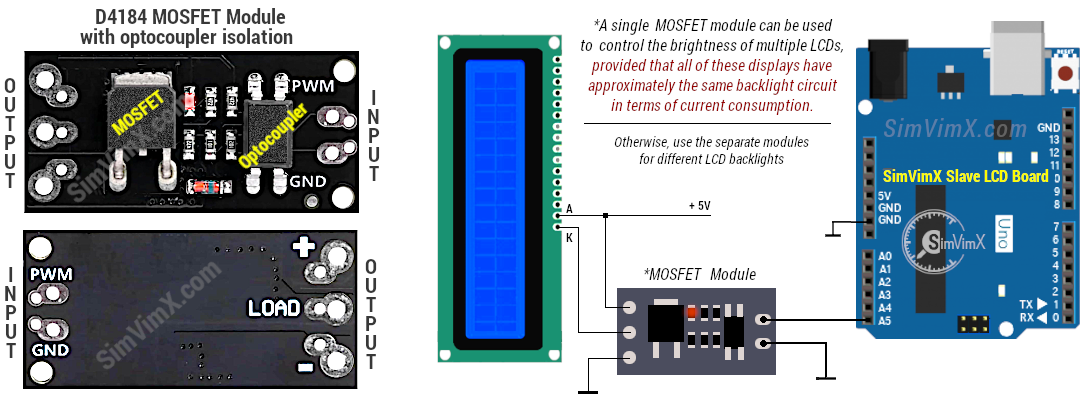
In the image above, one MOSFET module is connected to the backlight pins of one LCD, but it can also be used to control the backlight brightness of multiple LCDs (all +A/-K connected in parallel), but only if all of those displays have roughly the same backlight circuitry in terms of current consumption.
In fact, you can even control the backlight brightness of one LCD by directly connecting the +A pin to the A5 pin of the slave LCD board. If the backlight operating current is relatively low, you can connect two LCD displays. Use an additional current-limiting resistor if necessary.